

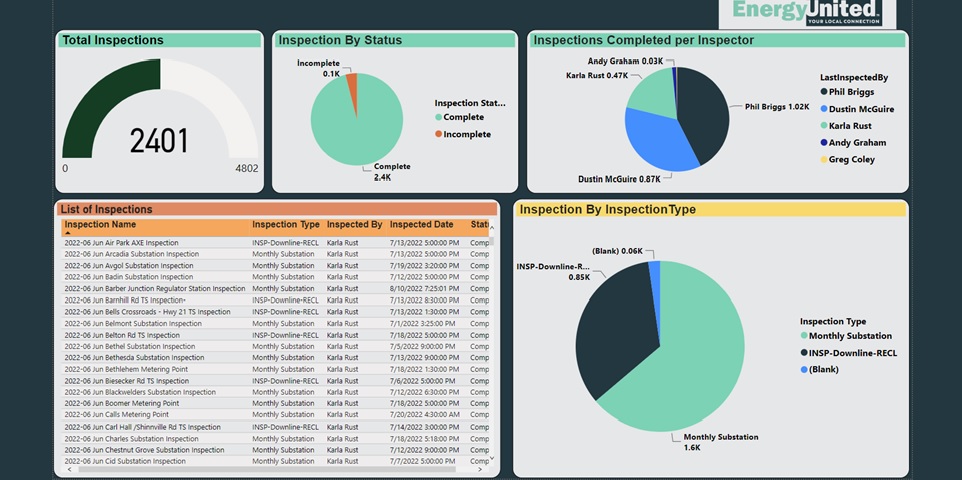
MinMax further fortified MinMax eSMART’s dashboard analytics by collaborating with Power BI and offering a georedundant instance of the MinMax eSMART database in the Microsoft Azure environment. Integration with Power BI enhances MinMax eSMART in several significant ways, leveraging Power BI’s powerful data visualization and analytics capabilities to improve the functionality and user experience of the MinMax eSMART substation asset management software.
Here are some key enhancements provided by the Power BI integration:
1. Advanced Data Visualization
Interactive Dashboards: Power BI allows the creation of interactive and dynamic dashboards that present data in a visually appealing and easily understandable format. Users can interact with the data, drill down into specifics, and gain deeper insights into substation performance and asset health.
Rich Visual Elements: Powe rBI offers a wide range of visual elements, such as charts, graphs, maps, and gauges, which help users quickly comprehend complex data and identify trends, patterns, and outliers.
2. Enhanced Data Analytics
Comprehensive Analytics: Users can perform advanced analytics on the data collected by MinMax eSMART, including trend analysis, predictive analytics, and what-if scenarios. This helps in making informed decisions and proactive maintenance planning.
Custom Reports: Power BI enables users to create custom reports tailored to specific needs, ensuring that relevant information is highlighted and easily accessible.
3. Real-Time Data Processing
Real-Time Monitoring: With Power BI, MinMax eSMART users can monitor real-time data from substations, allowing for immediate detection of issues and timely interventions. This real-time capability is crucial for maintaining system reliability and performance.
Automatic Data Refresh: Power BI can be set up to automatically refresh data at regular intervals, ensuring that the information presented is always up-to-date.
4. Improved Collaboration
Data Sharing: Power BI’s collaboration features allow users to share dashboards and reports with team members, stakeholders, and management, fostering better communication and collaboration across the organization.
Access Control: Users can control who can access specific dashboards and reports, ensuring that sensitive information is only available to authorized personnel.
5. Integration with Other Data Sources
Unified Data View: Power BI can integrate data from various sources, providing a unified view of information across different systems. This holistic view helps correlate data from MinMax eSMART with other business data, enhancing overall strategic planning and decision-making.
Cross-System Analysis: Users can perform cross-system analysis by combining MinMax eSMART data with data from other enterprise systems, such as ERP or CRM, to gain comprehensive insights into operational efficiency and asset management.
6. Scalability and Flexibility
Scalable Solutions: Power BI scales with the organization’s growth, handling increasing volumes of data and more complex analytical requirements without compromising performance.
Flexible Deployment: Power BI offers flexible deployment options, including cloud-based, on-premises, or hybrid solutions, catering to the specific needs and infrastructure of different organizations.
7. Enhanced User Experience
User-Friendly Interface: Power BI provides a user-friendly interface that makes it easier for non-technical users to create and customize their dashboards and reports.
Mobile Accessibility: Power BI’s mobile applications ensure that users can access their dashboards and reports on the go, providing flexibility and continuous access to critical information.
The integration of Power BI with MinMax eSMART significantly enhances the software’s capabilities, providing powerful data visualization, advanced analytics, real-time monitoring, improved collaboration, and a better overall user experience. This integration helps users make more informed decisions, optimize asset management, and improve the efficiency and reliability of substation operations.
For more information about MinMax eSMART and this integration, please email info@minmaxtech.com.
Originally published on minmaxtech.com.